If you don't have multiple cores and/or you have a small VPN, you may end up with a huge slow down of your web app, when rake tasks are executed. This can be a big issue especially when you use something like whenever to perform periodic tasks. Luckily there's a nice program:
nice is a program found on Unix and Unix-like operating systems such as Linux. It directly maps to a kernel call of the same name. nice is used to invoke a utility or shell script with a particular priority, thus giving the process more or less CPU time than other processes. A niceness of −20 is the highest priority and 19 or 20 is the lowest priority. The default niceness for processes is inherited from its parent process and is usually 0.
With nice you can tell your Linux kernel to give your rake tasks the lowest priority possible. Thanks to that, you can make sure, that any task with higher priority (like web UI server) won't get stuck because of the background rake task.
If you use a gem like whenever, you can easily integrate nice with it:
job_type :runner, "cd :path && nice -n 19 script/rails runner -e :environment ':task' :output"

every 30.minutes do
  runner 'Worker.new.perform'
end
or for a rake task with whenever, you can use this:
job_type :runner, "cd :path && :environment_variable=:environment nice -19 bundle exec rake :task --silent :output"

every 15.minutes do
  runner 'your_task'
end
Note: Of course this will help, when CPU is your bottleneck. Keep in mind that you're rake task might slow down your website because of many more reasons (IO, DB, etc).
Download both SDK and NDK. After that extract them in the same directory.
Rhodes gem
ruby -v
ruby 2.1.2p95 (2014-05-08 revision 45877) [x86_64-linux]
gem install rhodes --no-ri --no-rdoc
# This will take some time...
Fetching: extlib-0.9.16.gem (100%)
Successfully installed extlib-0.9.16
Fetching: templater-1.0.0.gem (100%)
Successfully installed templater-1.0.0
# Bla bla bla...
7 gems installed
and now the harder part...
Rhodes setup
rhodes-setup
We will ask you a few questions below about your dev environment.
JDK path (required) (): /usr/lib/jvm/java-8-oracle
Android SDK path (blank to skip) (): /home/user/Android/android-sdk-linux
Android NDK path (blank to skip) (): /home/user/Android/android-ndk-r10
Windows Mobile 6 SDK CabWiz (blank to skip) ():
BlackBerry JDE 4.6 (blank to skip) ():
BlackBerry JDE 4.6 MDS (blank to skip) ():
BlackBerry JDE 4.2 (blank to skip) ():
BlackBerry JDE 4.2 MDS (blank to skip) ():
Rhodes test app
Now we need a test app that will tell us what errors do we have related to our Ruby version:
rhodes app testapp
cd ./testapp
If you try to run rake -T you won't see any tasks. Instead you'll see path to your Rhodes gem sources:
rake -T
/home/user/.rvm/gems/ruby-2.1.2/gems/rhodes-3.5.1.12
# go there
cd /home/user/.rvm/gems/ruby-2.1.2/gems/rhodes-3.5.1.12
Rakefile changes
We need to make some changes to few files. To see rake tasks, we need to change one thing in Rhodes rakefile:
# I assume you're in Rhodes gem dir
# cd /home/user/.rvm/gems/ruby-2.1.2/gems/rhodes-3.5.1.12
# vim Rakefile

# Around line 33 - remove all of this:
module Rake
  class Task
    attr_accessor :comment
  end
end
Now in our app dir we can:
rake -T
rake build:android:eclipsebundle        # Build RhoBundle for Eclipse project
rake build:android:extensions           # Building native extensioons
rake build:android:rhobundle            # Build RhoBundle for android
rake build:symbian:rhobundle            # Build symbian rhobundle
rake build:wp8:rhobundle                # Build WP8 rhobundle
rake build:wp:rhobundle                 # Build WP7 rhobundle
rake clean:android                      # Clean Android
rake clean:bb                           # Clean bb
rake clean:bbsim                        # Clean bb and simulator
rake clean:iphone                       # Clean iphone
rake clean:win32                        # Clean win32
rake clean:wince                        # Clean windows ce
rake clean:wm                           # Clean wm
rake clean:wp                           # Clean wp
rake clean:wp8                          # Clean wp
rake config:checkbb                     # Check local blackberry configuration
rake device:android:debug               # Build debug self signed for device
rake device:android:production          # Build production signed for device
rake device:bb:debug                    # Build debug for device
rake device:bb:production               # Build production for device
rake device:iphone:production           # Builds and signs iphone for production
rake device:symbian:production          # Build production for device
rake device:win32:production            # Build installer for Windows
rake device:wince:production            # Build production for device or emulator
rake device:wm:production               # Build production for device or emulator
rake device:wp8:production              # Build production for device or emulator
rake device:wp:production               # Build production for device or emulator
rake run:android                        # build and launch emulator
rake run:android:device                 # build and install on device
rake run:android:rhosimulator           # Run application on RhoSimulator
# a lot of tasks...
rake uninstall:android                  # uninstall from emulator
rake uninstall:android:device           # uninstall from device
Android SDK setup
Go to your Android SDK dir and:
chmod +x ./tools/android
./tools/android
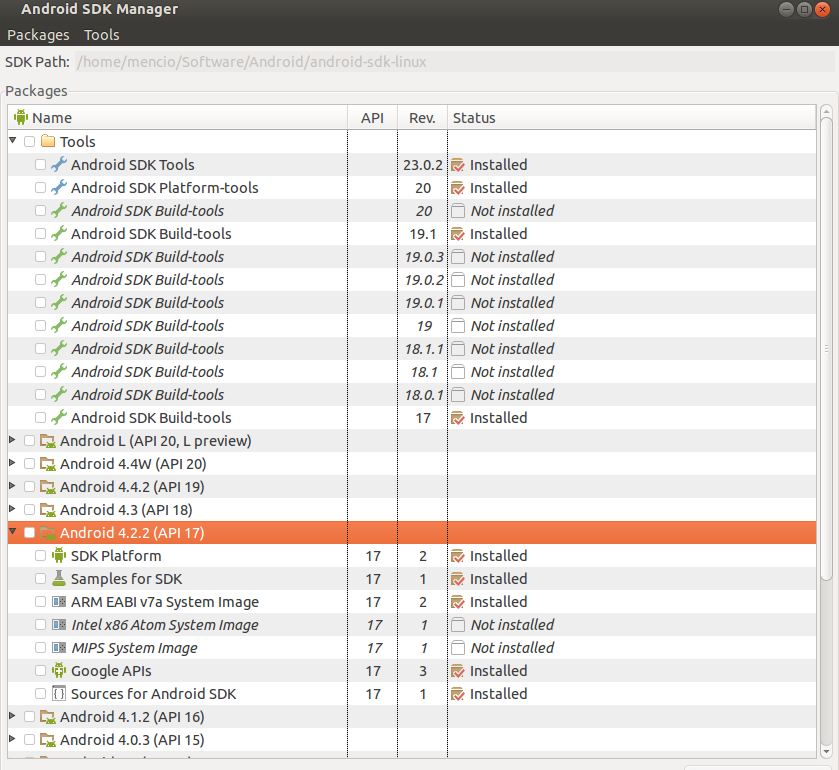
And use the Android 4.2.2 (API 17). Below you can see a printscreen of all the elements you need to have installed. If you have a Android L or any higher API than API 17, please remove them. Rhodes seems to have some issues with them.
androidcommon.rb changes
If you try to run your testapp, you will end up with following error:
Can't detect NDK toolchain path (corrupted NDK installation?)
/home/user/.rvm/gems/ruby-2.1.2/gems/rhodes-3.5.1.12/platform/android/build/androidcommon.rb:88:in `setup_ndk'
/home/user/.rvm/gems/ruby-2.1.2/gems/rhodes-3.5.1.12/platform/android/build/android.rake:388:in `block (2 levels) in <top (required)>'
/home/user/.rvm/gems/ruby-2.1.2/bin/ruby_executable_hooks:15:in `eval'
/home/user/.rvm/gems/ruby-2.1.2/bin/ruby_executable_hooks:15:in `<main>'
Tasks: TOP => run:android => run:android:emulator => config:android:emulator => config:android
(See full trace by running task with --trace)
edit androidcommon.rb and change:
@@ -71,8 +71,9 @@ def setup_ndk(ndkpath,apilevel)
   $ndktools = nil
   $ndkabi = "unknown"
   $ndkgccver = "unknown"
-  ["arm-linux-androideabi-4.4.3", "arm-eabi-4.4.0", "arm-eabi-4.2.1"].each do |abi|
+  ["arm-linux-androideabi-4.6", "arm-eabi-4.4.0", "arm-eabi-4.2.1"].each do |abi|
     variants = []
     variants << File.join(ndkpath, "toolchains", abi, "prebuilt", $ndkhost)
     variants << File.join(ndkpath, "build/prebuilt", $ndkhost, abi)
     variants.each do |variant|
@@ -118,6 +119,7 @@ def setup_ndk(ndkpath,apilevel)
   end

   variants.each do |variant|
     sysroot = File.join(ndkpath, variant, "android-#{last_api_level}/arch-arm")
     next unless File.directory? sysroot
     $ndksysroot = sysroot
@@ -244,7 +246,8 @@ def cc_run(command, args, chdir = nil)
   cmdstr = argv.map! { |x| x.to_s }.map! { |x| x =~ / / ? '' + x + '' : x }.join(' ')
   puts cmdstr
   $stdout.flush
-  argv = cmdstr if RUBY_VERSION =~ /^1\.[89]/
+  argv = cmdstr if RUBY_VERSION =~ /^(1\.[89]|2\.[0-9])/
   IO.popen(argv) do |f|
     while data = f.gets
       puts data
android_tools.rb changes
If you get this error:
NoMethodError: undefined method `rm_f' for AndroidTools:Module
/home/user/.rvm/gems/ruby-2.1.2/gems/rhodes-3.5.1.12/platform/android/build/android_tools.rb:211:in `run_emulator'
/home/user/.rvm/gems/ruby-2.1.2/gems/rhodes-3.5.1.12/platform/android/build/android.rake:1971:in `block (3 levels) in <top (required)>'
/home/user/.rvm/gems/ruby-2.1.2/bin/ruby_executable_hooks:15:in `eval'
/home/user/.rvm/gems/ruby-2.1.2/bin/ruby_executable_hooks:15:in `<main>'
Tasks: TOP => run:android => run:android:emulator
(See full trace by running task with --trace)
* daemon not running. starting it now on port 5037 *
* daemon started successfully *
error: device not found
- waiting for device -
rake aborted!
Unable to create AVD image. No appropriate target API for SDK version: 2.1
/home/mencio/.rvm/gems/ruby-2.1.2/gems/rhodes-3.5.1.12/platform/android/build/android_tools.rb:231:in `run_emulator'
/home/mencio/.rvm/gems/ruby-2.1.2/gems/rhodes-3.5.1.12/platform/android/build/android.rake:1971:in `block (3 levels) in <top (required)>'
/home/mencio/.rvm/gems/ruby-2.1.2/bin/ruby_executable_hooks:15:in `eval'
/home/mencio/.rvm/gems/ruby-2.1.2/bin/ruby_executable_hooks:15:in `<main>'
Tasks: TOP => run:android => run:android:emulator
(See full trace by running task with --trace)
you need to edit your build.yml file and change:
android:
  version: 2.1
to 4.2.2 (or any other that you use)
android:
  version: 4.2.2
After all of that, you should be able to run:
rake run:android
NameError: uninitialized constant Gem::Builder
If you have this issue and you still want to build Rhodes from sources (Github), please downgrade: