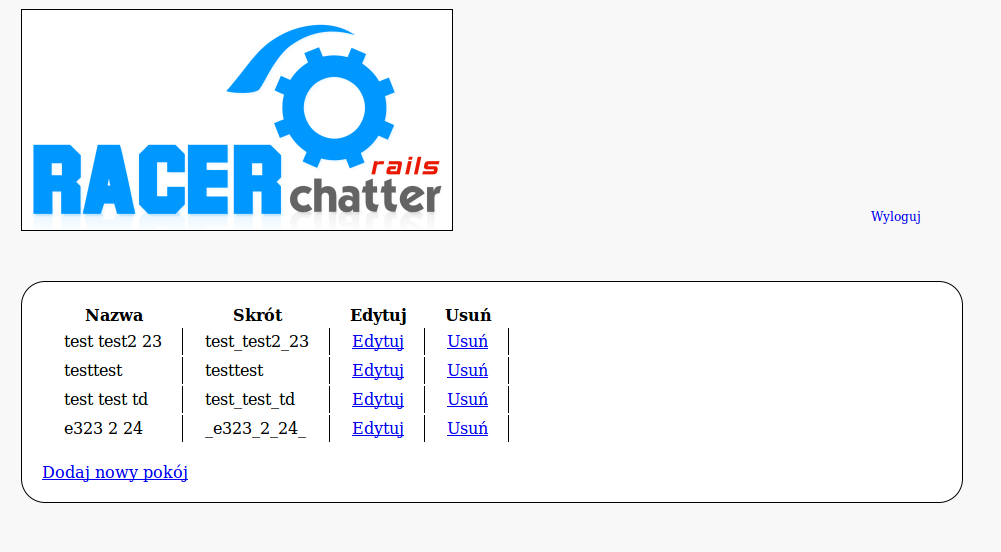
W części tej utworzymy system zarządzania pokojami.
Model pokoju
Model zawierać będzie takie pola jak:
- Nazwa - tekst informujący o czym jest dany pokój (np Ruby on Rails)
- ID - standardowo ;)
- Skrót - przerobiona nazwa, same małe litery oraz zamiast spacji znaki podkreslenia (ruby_on_rails) - do URLi - skrót będzie generowany automatycznie z nazwy
- Created_at, updated_at - standardowo :)
Z racji tego że przykłady jak tworzyć modele i kontrolery podałem w poprzedniej części tutoriala, tutaj ominę ten element i będę podawał tylko kod źródłowy bez kodu generatorów:
Najpierw kod migracji:
class CreateChatRooms < ActiveRecord::Migration
  def self.up
    create_table :chat_rooms do |t|
      t.string :name
      t.string :link

      t.timestamps
    end
  end

  def self.down
    drop_table :chat_rooms
  end
end
Kod modelu:
class ChatRoom < ActiveRecord::Base
  ROOM_MAX_LENGTH    = 14
  ROOM_MIN_LENGTH    = 5

  validates_uniqueness_of :name, :message => 'którą wybrałeś już istnieje'
  validates_length_of :name, :within =>  ROOM_MIN_LENGTH..ROOM_MAX_LENGTH,
    :too_long => "jest za długa",
    :too_short => "jest za krótka"
  validates_format_of :name, :with => /^[A-Z0-9_ ]*$/i,
    :message => 'jest nieprawidłowa'

  HUMANIZED_ATTRIBUTES = {
    :name => 'Nazwa'
  }

  def self.human_attribute_name(attr)
    HUMANIZED_ATTRIBUTES[attr.to_sym] || super
  end

  def save
    self.link = self.name.gsub(' ', '_')
    super
  end

end
Kontroler admin
Kontroler ten będzie RESTowy ponieważ idealnie się do tego nadaje ;)
Warto tutaj wspomnieć, że wbrew zasadom nie nazwę kontrolera ChatRooms tylko admin, ponieważ jest to jedyne zadanie admina w naszym czacie. Jednak gdybyście chcieli rozbudować ten czat to trzymajcie się prawidłowego nazewnictwa ;)
W routes.rb:
map.resources :chat_rooms, :controller => :admin
Nasz kontroler:
class AdminController < ApplicationController
  before_filter :authorize
  before_filter :only_admin

  layout "main"

  def index
    @chat_rooms = ChatRoom.find(:all)
  end

  def new
  end

  def create
    if request.post?
      @chat_room = ChatRoom.new(params[:chat_room])
      if @chat_room.save
        flash[:message] = 'Pokój został utworzony'
        redirect_to :action => :index
      else
        render :action => :new
      end
    else
      redirect_to :action => :index
    end
  end

  def edit
    @chat_room = ChatRoom.find(params[:id])
  end

  def update
    if request.put?
      @chat_room = ChatRoom.find(params[:id])
      @chat_room.update_attributes(params[:chat_room])
      if @chat_room.save
        flash[:message] = 'Pokój został uaktualniony'
        redirect_to :action => :index
      else
        render :action => :edit
      end
    else
      redirect_to :action => :index
    end
  end

  def destroy
    chat_room = ChatRoom.find(params[:id])
    chat_room.delete
    flash[:message] = 'Pokój został usunięty'
    redirect_to :action => :index
  end

end
Oraz odpowiednie widoki do niego:
index.rb:
<table id="room_list">
  <tr>
    <th>Nazwa</th>
    <th>Skrót</th>
    <th>Edytuj</th>
    <th>Usuń</th>
  </tr>
<% @chat_rooms.each do  |room| %>
  <tr>
    <td><%= room.name %></td>
    <td><%= room.link %></td>
    <td><%= link_to "Edytuj",edit_chat_room_path(room) %></td>
    <td><%= link_to "Usuń", chat_room_path(room), :confirm => "Jesteś pewien?", :method => :delete %></td>
  </tr>

<% end %>
</table>
<br/>
<%= link_to "Dodaj nowy pokój", new_chat_room_path %>
new.rb:
<h2>Tworzenie pokoju</h2>

<%= error_messages_for :chat_room %>

<% form_for :chat_room, :url => chat_rooms_path do |f| %>
  Nazwa: <%= f.text_field :name %>
  <%= submit_tag "Zapisz" %>
<% end %>
Oraz edit.rb:
<h2>Edycja pokoju</h2>


<%= error_messages_for :chat_room %>

<% form_for @chat_room, :method => :put do |f| %>
  Nazwa: <%= f.text_field :name %>
  <%= submit_tag "Zapisz" %>
<% end %>
I to by było na tyle na IV część toturiala. W tej części utworzyliśmy model pokoju i jego obsługę dla administratora. Od teraz możemy tworzyć i edytować pokoje w naszym czacie. Jak połączyć to z Juggernautem dowiemy się z części V i (może) VI jeśli część V okaże się za długa ;)
Części tutorialu:
- Juggernaut Rails Chat – część I (czym jest Juggernaut i jak go zainstalować)
- Juggernaut Rails Chat – część II (design)
- Juggernaut Rails Chat – część III (rejestracja i logowanie)
- Juggernaut Rails Chat – część IV (zarządzanie pokojami)
- Juggernaut Rails Chat – część V (łączenie użytkowników z pokojami)
- Juggernaut Rails Chat – część VI (odpalamy Juggernaut i nasz chat)
- Juggernaut Rails Chat – część VII (emotikonki i dźwięk)