Note: I'm also working on "code-on-incus" - a generalized version for running any AI coding assistant in isolated containers.
Why?
Three reasons: security, a clean host, and full contextual environments.
Security
Claude Code inherits your entire shell environment. Your SSH keys, git credentials, .env files with API tokens - everything. You either click "Allow" hundreds of times per session, or use --dangerously-skip-permissions and hope nothing goes wrong.
With coi, Claude runs in complete isolation. Your host credentials stay on the host. Claude can't leak what Claude can't see.
What remains exposed: The Claude API token must be present inside the container, and your mounted workspace files are accessible. A malicious or compromised model could theoretically exfiltrate these over the network. Network filtering to restrict outbound connections is under development.
Clean host, full capabilities
Claude loves installing things. Different Node versions, Python packages, Docker images, random build tools. On bare metal, this clutters your system with dependencies you may actually not need.
With coi, Claude can install and run whatever the task requires - without any of it touching your host. Need a specific Ruby version for one project? A Rust toolchain for another? Let Claude set it up in the container. Keep it if useful, throw it away if not.
VM-like isolation, Docker-like speed. Containers start in ~2 seconds.
Contextual environments
Each project can have its own persistent container with Claude's installed context and setup. Your web project has Node 20 and React tools. Your data project has Python 3.11 with pandas and jupyter. Your embedded project has cross-compilers and debugging tools.
Claude remembers what it installed and configured - per project, completely isolated from each other.
Why Incus over Docker?
Claude often needs to run Docker itself. Docker-in-Docker is a mess - you either bind-mount the host socket (defeating isolation) or run privileged mode (no security). Incus runs system containers where Docker works natively without hacks.
Incus also handles UID mapping automatically. No more chown after every session.
Quick start
# Install (or build from sources if you prefer)
curl -fsSL https://raw.githubusercontent.com/mensfeld/claude-on-incus/master/install.sh | bash

# Build image (first time only)
coi build

# Start coding
cd your-project
coi shell
Features And Capabilities
Multi-slot sessions - Run parallel Claude instances for different tasks. Each slot has its own isolated home directory, so files don't leak between sessions.
coi shell --slot 1  # Frontend work
coi shell --slot 2  # API debugging
Session resume - Stop working, come back tomorrow, pick up where you left off with full conversation history. Sessions are workspace-scoped, so you'll never accidentally resume a conversation from a different project:
coi shell --resume
Persistent containers - By default, containers are ephemeral but your workspace files always persist. Enable persistence to also keep your installed tools between sessions:
coi shell --persistent
Detachable sessions - All sessions run in tmux, allowing you to detach from running work and reattach later without losing progress. Your code analysis or long-running task continues in the background:
# Detach: Press Ctrl+b d
# Reattach to running session
coi attach
The "dangerous" flags are much safer now
Claude Code's --dangerously-skip-permissions flag has that name for good reason when running on bare metal. Inside a coi container, the threat model changes completely:
Risk
Bare metal
Inside coi
SSH key exposure
Yes
No - keys not mounted
Git credential theft
Yes
No - credentials not present
Environment variable leaks
Yes
No - host env not inherited
Docker socket access
Yes
No - separate Docker daemon
Host filesystem access
Full
Only mounted workspace
The "dangerous" flags give Claude full autonomy to work efficiently. The container isolation ensures that autonomy can't be weaponized against you.
Summary
coi gives you secure, isolated Claude Code sessions that don't pollute your host. Install anything, experiment freely, keep what works, discard what doesn't.
I am excited to announce the release of llm-docs-builder, a library that transforms Markdown documentation into an AI-optimized format for Large Language Models.
TL;DR: Open source tool that strips 85-95% of noise from documentation for AI systems. Transforms Markdown, generates llms.txt indexes, and serves optimized docs to AI crawlers automatically. Reduces RAG costs significantly.
If you find it interesting or useful, don't forget to star ⭐ the repo - it helps others discover the tool!
The Problem
If you have watched an AI assistant confidently hallucinate your library API – suggesting methods that do not exist or mixing up versions – you've experienced this documentation problem firsthand. When AI systems like Claude, ChatGPT, and GitHub Copilot try to understand your docs using RAG (Retrieval-Augmented Generation), they drown in noise.
Beautiful HTML documentation with navigation bars, CSS styling, and JavaScript widgets becomes a liability. The AI retrieves your "Getting Started" page, but 90% of what it processes is HTML boilerplate and formatting markup. The actual content? Buried in that mess.
Context windows are expensive and limited.Research shows that typical HTML documents waste up to 90% of tokens on pure noise: CSS styles, JavaScript code, HTML tag overhead, comments, and meaningless markup. This waste adds up fast across thousands of pages and millions of queries.
What llm-docs-builder Does
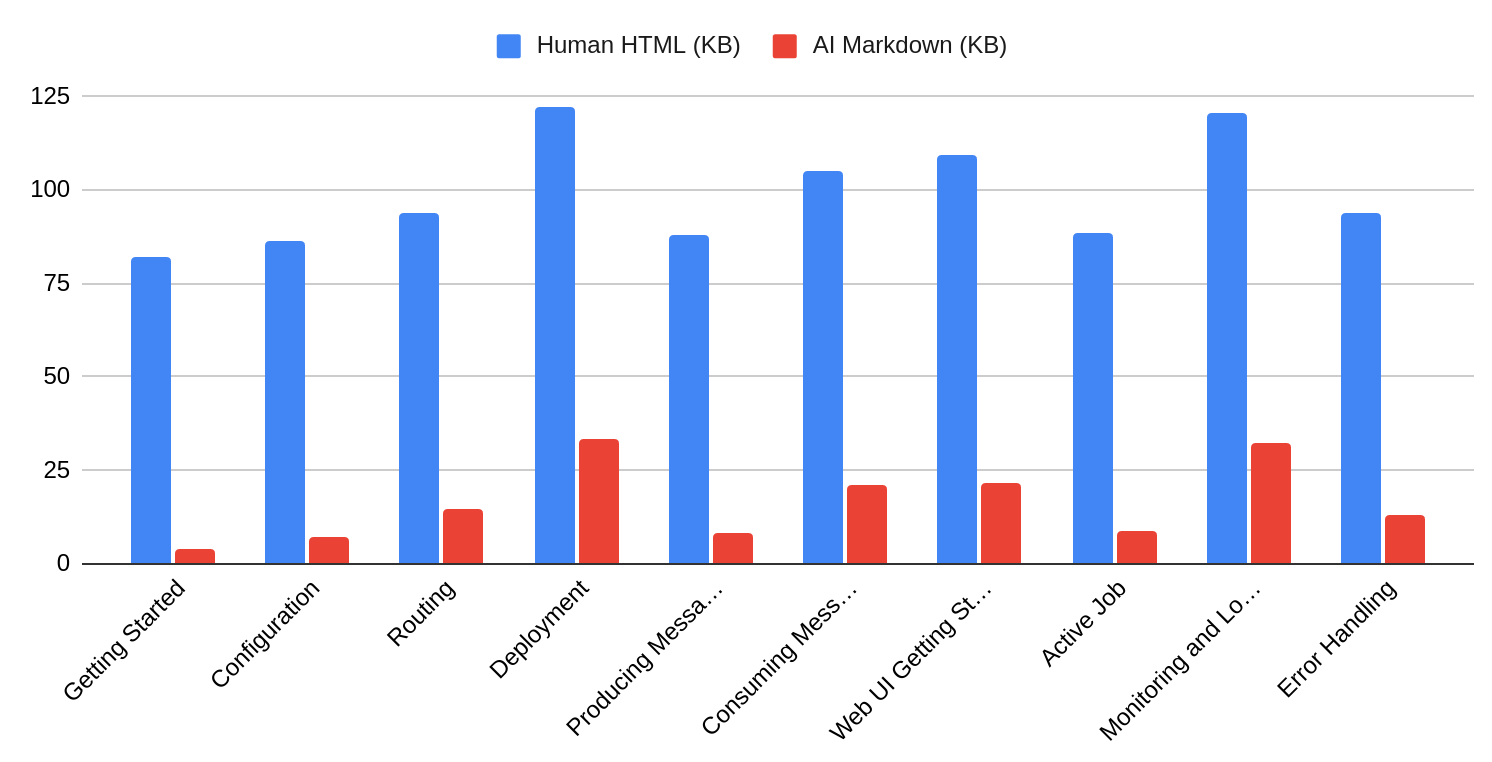
This tool transforms your markdown documentation to eliminate 85-95% of the noise compared to the HTML version, letting AI assistants focus on the actual content. I have extracted it from the Karafka framework's documentation build system, where it has served thousands of developers in production for months.
Real metrics from Karafka documentation:
Page
HTML
Markdown
Reduction
Getting Started
82.0 KB
4.1 KB
95% (20x)
Monitoring
156 KB
6.2 KB
96% (25x)
Configuration
94.3 KB
3.8 KB
96% (25x)
Average: 93% fewer tokens, 20-36x smaller files
Before and After Example
Before transformation (98 tokens):
---
title: Getting Started
description: Learn how to get started
tags: [tutorial, beginner]
updated: 2024-01-15
---
[](https://ci.example.com)
[](LICENSE)
# Getting Started
> **Note**: Requires Ruby 3.0+
Welcome to our framework! Let's get you up and running...
After transformation (18 tokens, 81% reduction):
# Getting Started

Welcome to our framework! Let's get you up and running.
Why This Matters
Cleaner documentation means AI assistants spend less time processing noise and more time understanding your actual content. This translates to lower costs per query, fewer hallucinations as shown in the HtmlRAG study, and much faster response times.
How It Works
llm-docs-builder applies several transformations to your markdown documentation to make it RAG-friendly, then generates an llms.txt index that helps AI agents discover and navigate your content efficiently. Below are examples of these transformations in action.
1. Hierarchical Context Preservation
When documents are chunked for RAG, context loss leads to hallucinations. Consider:
Now the chunk is self-contained even when retrieved in isolation.
2. Semantic Noise Removal
Strips YAML/TOML frontmatter.
Removes HTML comments and build badges.
Expands relative links to absolute URLs.
Normalizes whitespace while preserving code blocks.
Preserves code syntax highlighting markers.
3. Enhanced llms.txt Generation
This feature creates llms.txt index files - the emerging standard for AI-discoverable documentation, adopted by Anthropic, Cursor, Pinecone, LangChain, and 200+ projects.
Generated llms.txt includes token counts and timestamps and provides AI-readable documentation for your:
Configure your web server to automatically serve markdown to LLM crawlers while continuing to serve HTML to human visitors. Detect AI user agents (ChatGPT-User, GPTBot, anthropic-ai, claude-web, PerplexityBot, meta-externalagent) and serve .md files instead of .html.
Implement this feature to automatically detect AI agents and serve them raw markdown, as shown in the following example:
Tokenization efficiency matters for both cost and performance. The following table shows a simple heading comparison:
Format
Example
Token Count
HTML
<h2>Section Title</h2>
7-8 tokens
Markdown
## Section Title
3-4 tokens
HTML requires opening and closing tags for every element (2x overhead), special characters (<, >, ) consume multiple tokens each, and attributes add 2-3 tokens per occurrence. Markdown uses single characters for formatting (**, *, -, |) that often tokenize to single tokens, requires no closing tags, and maintains semantic structure without attribute bloat.
Format efficiency comparison:
Plain text: 96% reduction vs raw HTML
Cleaned HTML (CSS/JS removed): 94% reduction
Markdown: 90% reduction
While cleaned HTML can match Markdown's efficiency, the preprocessing required is complex and error-prone. Markdown provides the optimal balance: simple to generate, efficient to tokenize, and preserves semantic structure naturally. For RAG systems that chunk and retrieve documents independently, a clear hierarchy of Markdown ensures that each chunk remains interpretable without its surrounding context.
When NOT to Use This
My llm-docs-builder will not be of great use when:
Your docs rely heavily on visual diagrams that cannot be described in Markdown.
You are already serving pure Markdown without HTML noise.
Your documentation is primarily an API reference with minimal prose (consider OpenAPI/Swagger instead).
Next Steps
Your documentation is already being consumed by LLMs. The question is whether you're serving optimized content or forcing them to parse megabytes of HTML boilerplate.
Install llm-docs-builder via Docker.
Run compare on your existing docs to measure potential savings.
Configure llm-docs-builder.yml for your project.
Run bulk-transform to generate optimized versions.
Use server configuration to serve markdown to AI crawlers.
Every query you optimize saves money and improves the quality of AI-assisted development with your framework.
llm-docs-builder is open source under the MIT License. It is extracted from production code powering the Karafka framework documentation.